
Disclaimer: This wiki article is applicable exclusively to the new Smartforms functionality introduced with the deployment on 31 August 2026. All processes, screenshots, and instructions contained herein are based on the version of Smartforms available after this deployment. Users operating on a prior version may encounter differences in functionality, user interface, or process flow.
The Certification Body Decision Smartform is intended to allow Certification Bodies to record a separate certification outcome for each product included in an audit. This supports audits in which some products meet the certification requirements while others have an open non-conformance or must be suspended.
Please check the Information badge located on the Smartform
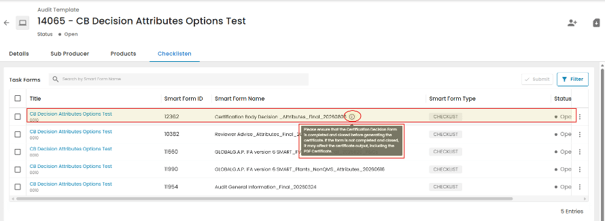
Key Points
- Certification decisions are recorded at product level.
- The same audit may include both positive and negative product – specific certification decisions.The product affected in an Non-Conformance ticket should correspond to the product receiving the negative certification decision.
- Only production processes of products with a positive certification decision status are intended to appear in the certificate PDF.
- A new decision can be taken for production processes of products affected by a negative certification decision through a certificate modification process, provided that the corrective actions have been completed and accepted by the CB .
- The Certification Body must select the correct status according to the applicable certification rules.
Certification Decision Options
When the certification body is recording the certification decision, the form provides two options for the decision
- Positive
- Negative
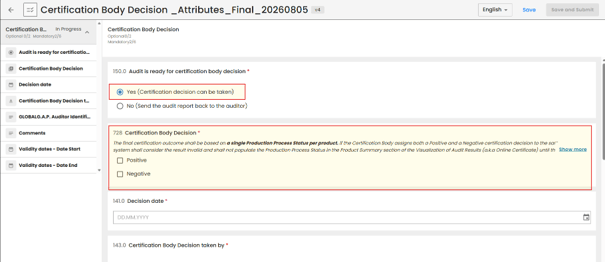
The certification decision and the corresponding Product´s Production Process Status are recorded for the applicable product or products.
Recording a Positive Decision
If the product’s production processes meet the applicable certification requirements, a positive certification decision will be taken. Go to the Certification Body Decision section and select “Positive”
As a result of selected option, the system will create new data field “Positive Audit results”
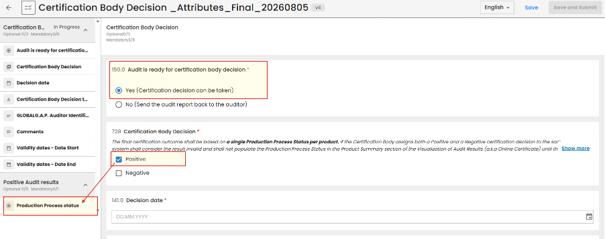
Open “Positive Audit results” data field and select the applicable Product´s Production Process Status depending on Farm Assurance Product the audit is created for – Certified/Compliant or Assessed.
| Product´s Production Process Satus | Certification Decision Type for eligible FAPs | Applicability |
| Certified/Compliant | Positive | All eligible standards and Add-ons except for GRASP v2/v2.1 |
| Assessed | Positive | For GRASP v2/v2.1 |
IMPORTANT NOTE: “Assessed” Production Process status shall apply only to GRASP GRASP v2/v2.1
Select the product or products to which the positive decision applies. (Use CTRL + F to search for the products if necessary)
Save the decision.
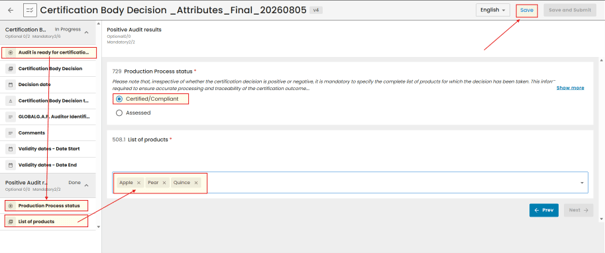
The selected Product´s Production Process Status is assigned to the chosen products and is intended to appear in the certificate summary.
Recording a Negative Decision
If a product’s production processes do not meet the applicable certification requirements, a negative certification decision will be taken Open the Certification Body Decision section and select Negative.
| Product´s Production Process Satus | Certification Decision Type for eligible FAPs | Applicability |
| Assessed | Negative | For GRASP v2/v2.1 |
| Audited | Negative | Only for initial audits in version 6 and linked add-ons |
| Open non-conformance | Negative | Only for initial audits in CFP v1.1, PHA v1.2, HPSS v1.2, IFA v5.2 and ADG.A.P. and linked add-ons |
| Self-declared suspension | Negative | All eligible FAPs |
| Product suspended | Negative | All eligible FAPs except IFA v5.2 and CfP v1.1 |
IMPORTANT NOTE: “Assessed” Production Process status shall apply only to GRASP GRASP v2/v2.1
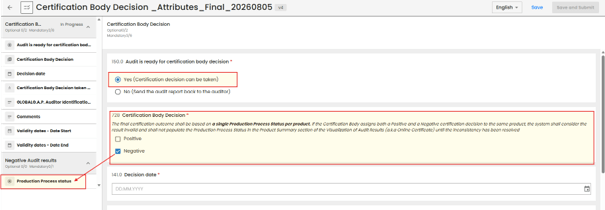
Select the appropriate Product´s Production Process Status according to the applicable certification rules.
Select the affected product or products.
Save the decision.
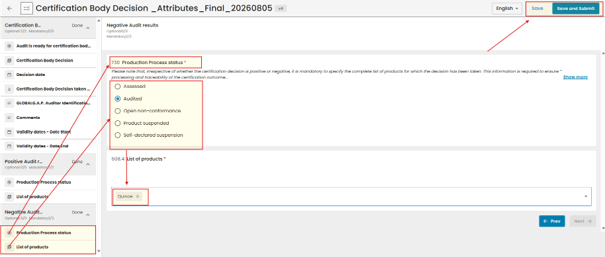
Responsibility: The Certification Body is responsible for selecting the correct production process status for each audited product. In this example we used applicable Product´s Production Process Status “Audited” applicable for initial IFA v6 Audit.
Recording Different Decisions in the Same Audit
The form is intended to support both positive and negative certification decisions within the same audit.
Example
Our example audit used to create this wiki covers the following products: Apple, Pear and Quince as seen in the example Audit´s list of products below:
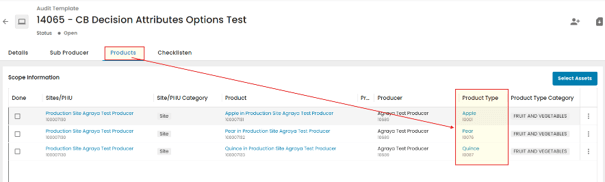
The Certification Body records the following decisions:
| Product | Decision |
| Apple | Positive |
| Pear | Positive |
| Quince | Negative |
Open the Certification Body Decision section.
Select both Positive and Negative.
The system will enable both Production Process Statuses for Positive and Negative Audit results
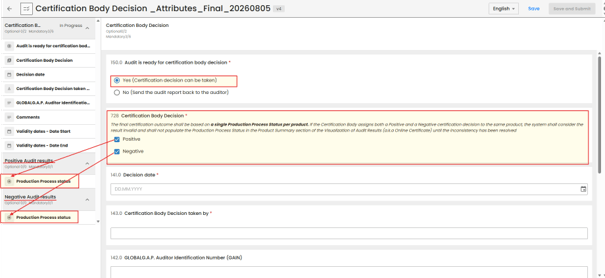
For Positive decision select the applicable Production Process Status for the respective product, such as Certified or Assessed and select the product(s) to which the positive decision applies (in our example positive decision will be taken for Apple and Pear)
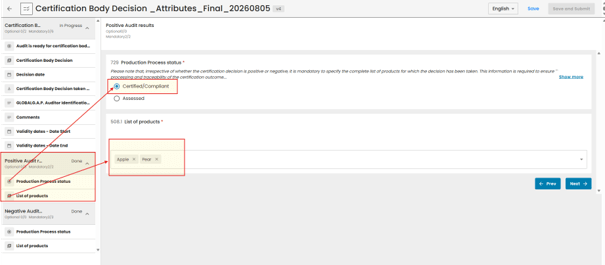
For Negative decision select the appropriate Production Process Status according to the applicable certification rules and select the affected product(s) (in our example negative decision will be taken for Quince)
Save the decision!
Closing the Audit
Note: Under the previous process, closed audits were assigned the statuses “Closed Compliant” or “Closed Non-Compliant,” and the Certification Body Decision was recorded only at Audit level.
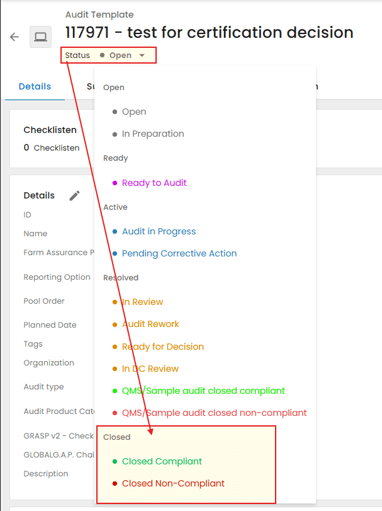
The new process allows Certification Bodies to record certification decisions directly on Product´s Production Process Level via the dedicated Certification Body Decision Attributes Smartform.
When closing the audit, use the status “Closed.” This audit status no longer reflects the Certification Body decision, which is now recorded separately in the Certification Body Decision Attributes Smartform.
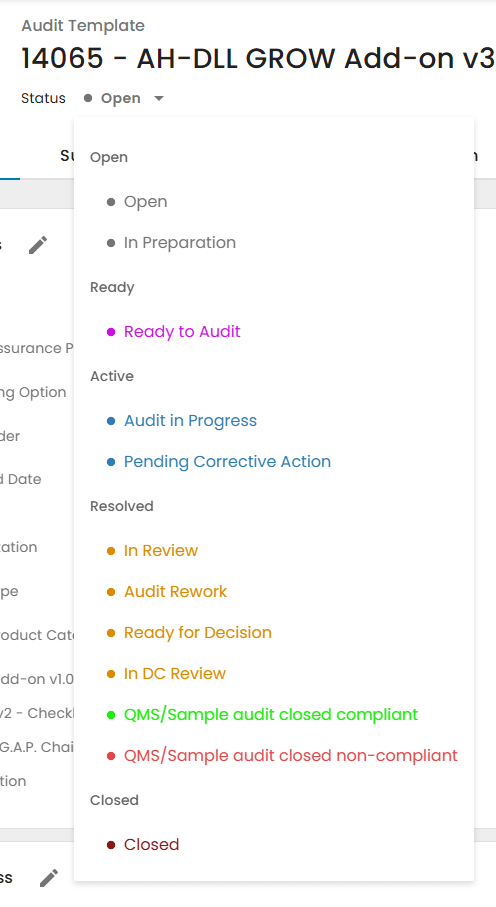
- After closing the Audit, issue the Certificate or Letter of Conformance.
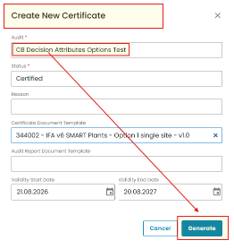
The Certificate Report displays the Certification Body Decision for the production process of each registered product in the Certificate Product Summary, based on the product-level decisions recorded in the Certification Body Decision Attributes Smartform.
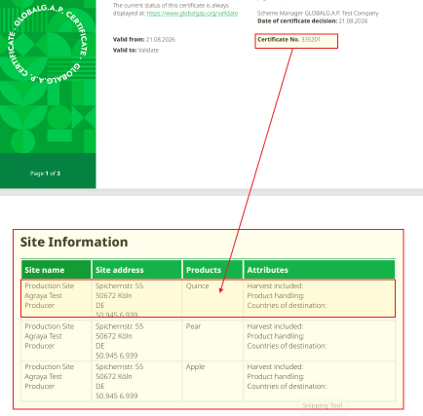
For this example, we created a certificate from an audit containing both positive and negative decisions.
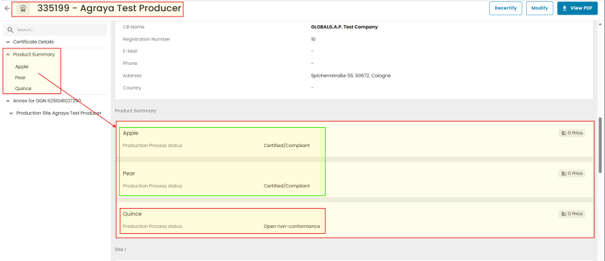
The PDF certificate will display only products with a positive Certification Decision.
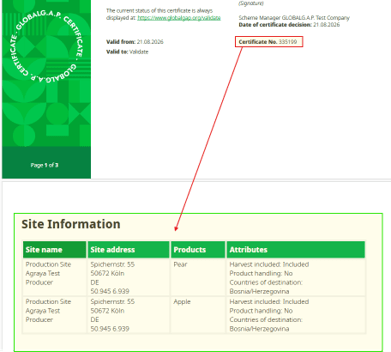
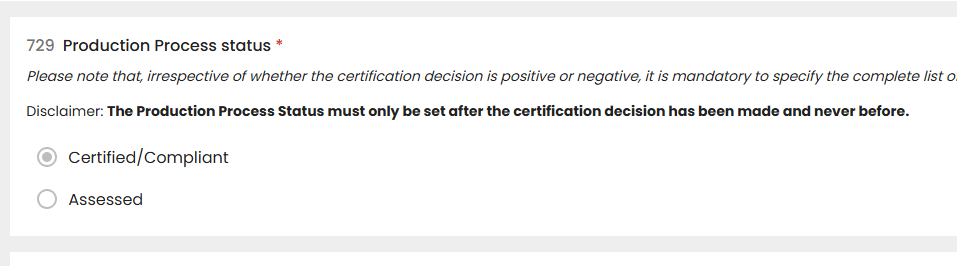
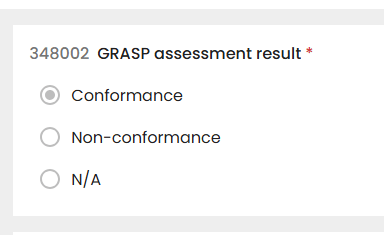
Note: For the product and site information to be displayed in the PDF certificate, the Production Process Status must be set to Certified/Compliant, or to Assessed for GRASP. For GRASP, the GRASP Assessment Result must additionally be set to Conformance. Products that do not have the required status/result will not be displayed in the PDF certificate:
Relationship with Non-Compliance Tickets
When a negative decision is connected to an NC:
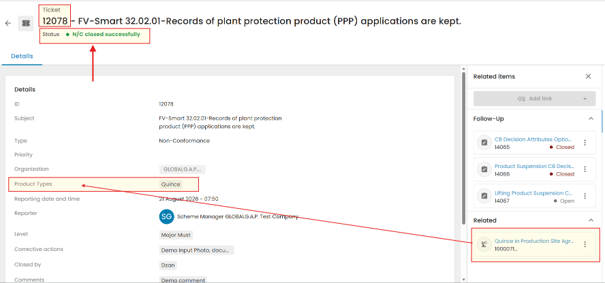
- Create or complete the relevant NC ticket as instructed here: NC Ticket creation – GLOBALG.A.P. Wiki
- Select the Production Process of Product affected by the finding.
- Enter the findings, comments and required corrective action.
- Ensure that the production processes of products in the NC ticket corresponds to the product receiving the negative certification decision.
Example: If the NC applies only to Quince, associate the NC ticket with Quince rather than all products in the audit.
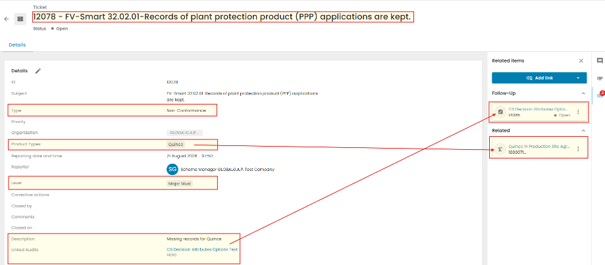
Changing Product´s Production Process Status after positive certification decision is made
The planned workflow allows the Certification Body to change Product´s Production Process Status after positive certification decision is made after the finding has been resolved:
- Confirm that the required corrective action has been completed.
- Perform a certificate modification.
- Open the Certification Decision form.
- Remove the product from the negative audit results tab
- Add the product to the positive Audit result tab
- Assign the appropriate positive Production Process Status.
- Issue the modified certificate.
- The new certificate will then include this newly added product’s production processes together with the others positively decided previously. The previously closed audit shall not be amended
Product Suspension Process
In this example I will be using Modification Process of already issued certificate shown above and suspended production processes of product Quince.
Production Processes of products Not Meeting Certification Requirements
For production processes of products that do not comply with the applicable certification requirements:
- Go to Certification Body Decision Attributes Smartform of the modification audit
- Select Negative decision for those Product´s Production Processes that still have open or unresolved NCs
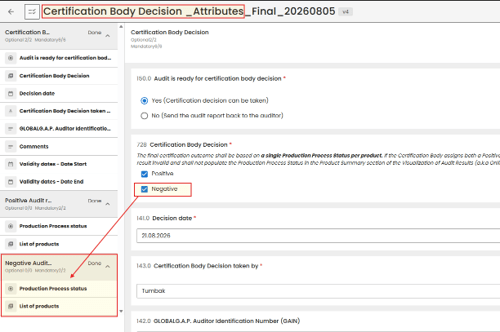
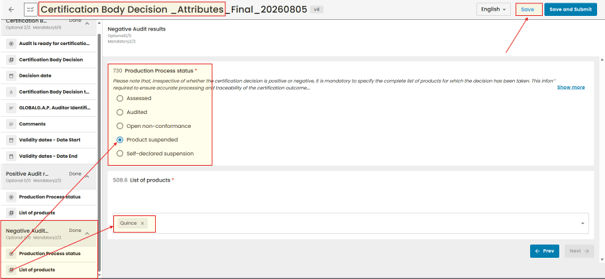
3. Select the Production Process Status: Product Suspended and select the affected product.
Set Audit status to “Closed” and start with the certificate issuance process.
In the certification “Reason” add “Product Suspended”
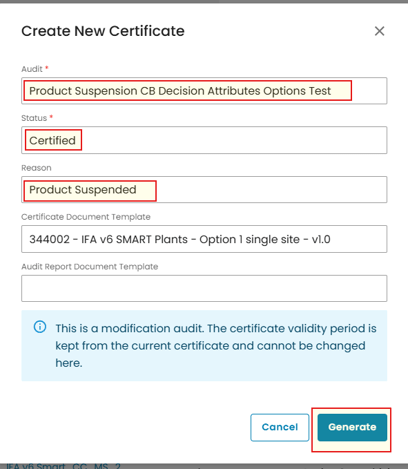
The Certificate Report now displays the Certification Body Decision for the production processes of each registered product in the Certificate Product Summary, based on the product-level decisions recorded in the Certification Body Decision Attributes Smartform.
In this example, we created a certificate from an audit containing both positive and negative decisions and the negative decision affects only the production processes of product Quince with “Production Process Status” selected as “Suspended”
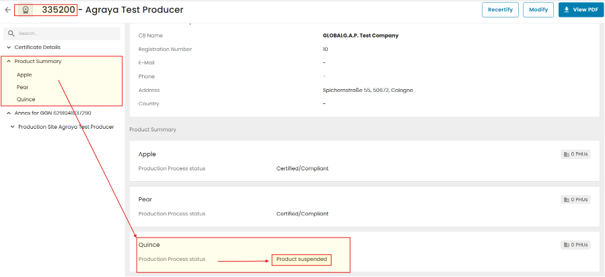
- The PDF certificate will display only products with a positive Certification Decision.
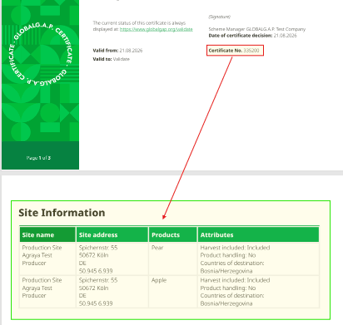
Lifting Product Suspension
The suspension of a product’s certified production processes may be lifted after successful corrective actions are taken. As soon as the CB accepts the corrective actions anew certification decision shall be made in order to issue a new certificate and include the respective products’ production processesthe Certification Body may lift the suspension through Modification of Certificate in CertifierOS.
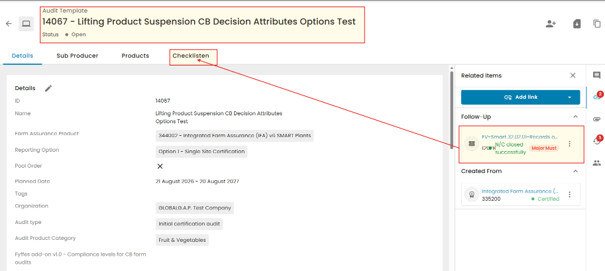
Go to Checklists and open the “Certification Body Decision Attributes” Smartform.
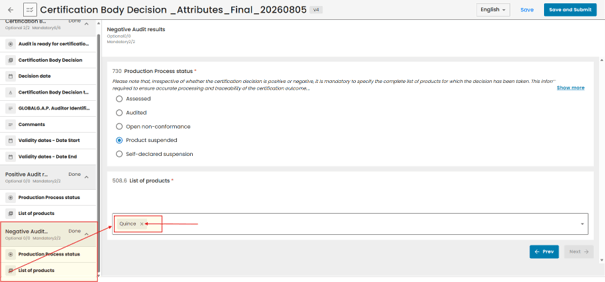
The product must be removed from the Negative Audit result tab with Production Process Status “Product Suspended”
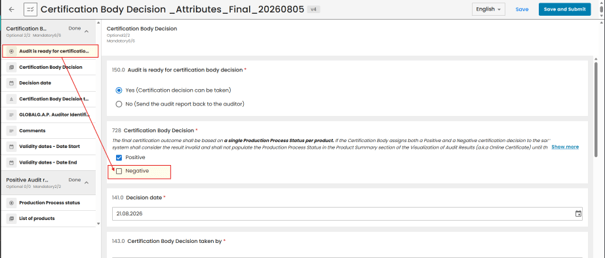
Unselect “Negative” Certification Body Decision on the Smartform.
Reassign product to a Positive Audit Result tab with the appropriate positive Product Process Status and save changes.
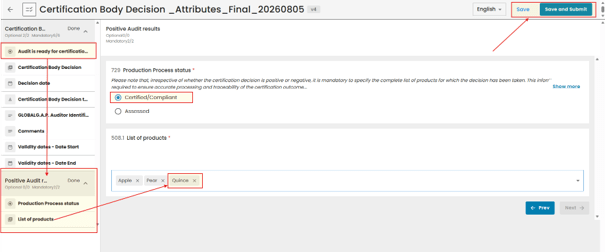
After completing the modification, set the audit status to “Closed,” continue with the certification process, and issue the revised certificate. The Production Processes Status will then be included with the other positively certified Production Processes Statuses.
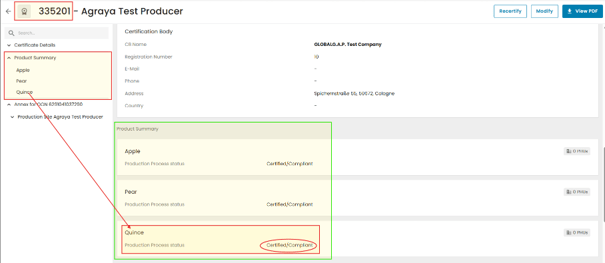
The PDF certificate will now display all products with a positive Certification Decision.
- Note: The Certification Body remains responsible for selecting the appropriate status according to the applicable certification rules