
| Key principle: In CertifierOS, certificate suspension is handled by changing the Certificate or Letter of Conformance status to Suspended. The suspension period must be documented outside CertifierOS by the Certification Body. |
| Important: The process applies only while the Certificate or Letter of Conformance is still valid. Expired certificates cannot be suspended according to the GLOBALG.A.P. general regulations. |
Key Principles
- A certificate or Letter of Conformance is suspended by changing its status from Certified (or Assessed e.g. for GRASP) to Suspended.
- CertifierOS does not provide a dedicated field to record a suspension period, suspension reason, or suspension end date.
- The Valid to date shall not be used to represent the suspension period, as this is the certificate /LoC validity end date.
- The Certification Body must maintain its own internal record of the suspension decision and related details.
Suspending a Valid Certificate or Letter of Conformance
Use this process when the Certificate or Letter of Conformance is still valid
Procedure
- Open the Certificate Browser in CertifierOS.
- Search for the relevant certificate or Letter of Conformance.
- Click the three-dot menu on the right side of the listed certificate.
- Select Edit.

- Change the certificate status to Suspended.
- Save the change according to the available system options.
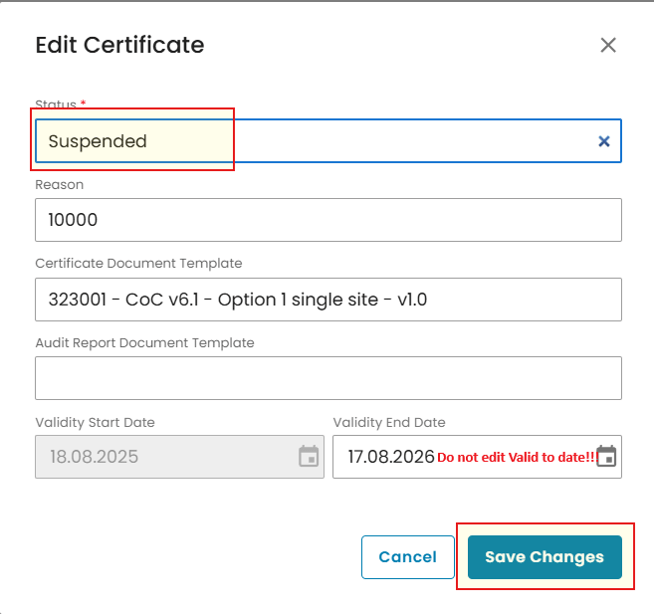
Note: Like you can see in the screenshot below, changing the status to “Suspended” the system will create new certificate version and ID while keeping the certificate linked to the original audit.

| Do not change validity: Do not change the Valid to date for suspension purposes. The suspension period shall be documented internally by the Certification Body in the decision taken. |
Note: A certificate with the status Suspended does not automatically change to Expired when the validity period ends. It remains marked as Suspended even after the Valid to date has passed.
Lifting a Suspension for the certificate with ongoing validity period:
Note: Lifting Certificate Suspension requires Certificate Modification in order to document the decision! For detailed instructions on how to modify certificates in CertifierOS follow the wiki link below: https://wiki.globalgap.org/kb/certifieros/use-modification-audit/
When to use this process
Use this process when the reason for suspension has been resolved and the certificate is still within its original validity period.
Procedure
- Go to Certificates Browser window.
- Locate the Certificate that is currently suspended and needs the suspension lifted.
- Click on three dots and Select “View”.

- In the Certificate report window click on “Modify” button and initiate certificate Modification procedure
- Issue new Certificate or Letter of Conformance from the Modification Audit with the status “Certified /Assessed”
Certificate modification to lift suspension will create new certificate version and ID linking it to the Modification Audit created during the process
Lifting a Suspension for the certificate with expired validity period:
To lift suspension for the certificate with Expired Validity Period CB will follow the Recertification process in CertifierOS.
IMPORTANT: Do not manually change the status from “Suspended” to “Certified/Assessed” for the certificates with expired validity period!
Expired Certificates
A suspension can only be applied while the certificate is still valid. If the certificate has already expired, the status of the expired certificate cannot be changed to Suspended through the standard process.
Where there is no valid certificate, there is no suspension sanction to implement in the standard process.
| Certificate snapshot: Certificate information represents a timestamp or snapshot of the information provided in the Audit template at the moment of certificate issuance. Updating audit or asset data alone does not retrospectively update an already issued certificate. |
Common Questions
Can I set a suspension end date in CertifierOS?
No. CertifierOS does not provide a dedicated suspension-period field. The Certification Body must record this internally.
Can I use Valid to date as the suspension deadline?
No. The Valid to date represents the certificate validity end date and must not be used as the suspension deadline.
Will a suspended certificate automatically become expired after the Valid to date?
No. A suspended certificate remains in Suspended status even after the validity period ends.
Can I suspend an expired certificate?
No, as this is against the GLOBALG.A.P. general regulations.
Can I lift a suspension and change the Valid to date?
No. If the suspension is lifted while the certificate is still valid, the validity period must not be changed.
The suspension period is not visible in the Supply Chain Portal
Suspension details and suspension periods cannot currently be displayed in the Supply Chain Portal.