
In case a GRASP assessment work order needs to be amended to adapt to a change in the workers situation (e.g. from family farm to hired workers) the Certification Body can change the checklist type through the Certificate Modification or Recertification process.
Two scenarios are available for changing the GRASP v2 checklist type:
- The GRASP Letter of Conformance (LoC) Modification or Recertification process was not initiated – the latest LoC has Recertify and Modify buttons active
- Recertification or Modification has been initiated, and new Audit has been created from the latest GRASP Letter of Conformance (LoC) – the latest LoC has inactive Recertify and Modify buttons
Scenario 1: The latest GRASP LoC has Recertify and Modify buttons active:
In this scenario, neither Modification nor Recertification has been initiated from the currently valid GRASP LoC, and both options remain available.
Regardless of which process is used, complete the following steps to change the GRASP v2 checklist type:
- Locate the GRASP LoC and select the link to the assessment used to issue it.

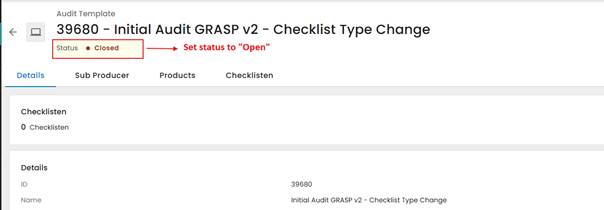
Note: The initial assessment used in this example was created with the “GRASP v2 Hired/Subcontracted workers (Initial year)” checklist type.
- Change the work order status from “Closed” to “Open.”
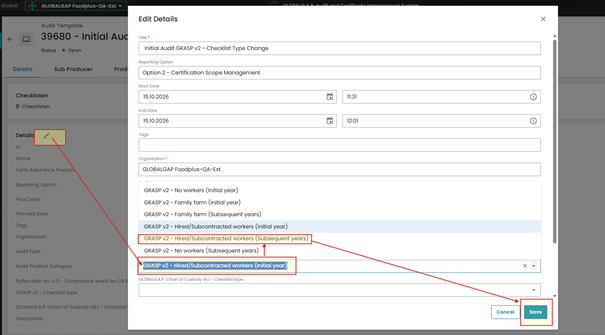
- In the work order details, select the Edit (pencil) icon, change the GRASP v2 checklist type, and select “Save.”
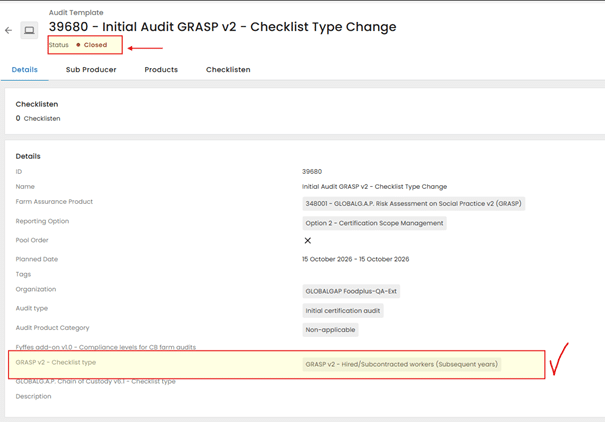
In this example, the checklist type is changed to “GRASP v2 Hired/Subcontracted workers (Subsequent years).”
- Change the work order status back to “Closed.”
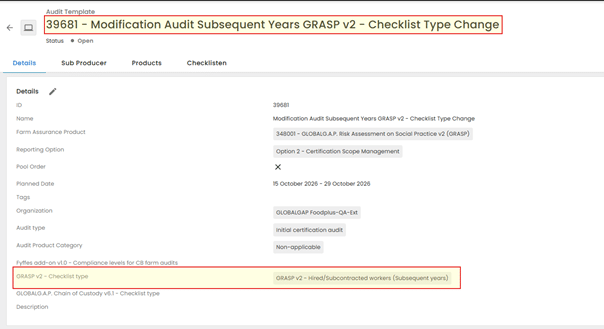
- Initiate the applicable process: Recertification or Modification of the GRASP LoC. The system copies the updated GRASP v2 checklist type to the new work order and creates the corresponding Smartforms.
Important:
After the new Recertification or Modification work order has been created, return to the previous work order and restore the original GRASP v2 checklist type to keep the assessment details accurate.
- Change the work order status to “Open.”
- Edit the work order details and change the GRASP v2 checklist type back to the original checklist type.
- Save the changes and change the work order status back to “Closed.”
Continue working with the newly created Recertification or Modification assessment work order. Complete the required data entry and issue the new or updated GRASP Letter of Conformance.
Scenario 2: The latest GRASP LoC has inactive Recertify and Modify buttons – New GRASP assessment work order has been created
In this scenario, Recertification or Modification has already been initiated from the most recent GRASP LoC, and the system has created a new Recertification or Modification assessment work order.
Regardless of the process initiated, complete the following steps to change the GRASP v2 checklist type:
- Open the GRASP assessment work order created through the Recertification or Modification process.
- In the work order details, change the GRASP v2 checklist type and select “Save.”
- The system will not automatically update and replace the existing Smartform when the GRASP v2 checklist type is changed in the work order details.
- Complete and submit all Smartforms and then change the work order status to “Closed.”
- Issue the new GRASP Letter of Conformance.
Note: The newly issued LoC will still be based on the obsolete GRASP checklist type details because the system did not update the information after the checklist type was changed.
- Initiate a new Modification from the newly issued GRASP LoC to create a new Modification Work Order. The system will then assign the correct GRASP Smartforms based on the GRASP v2 checklist type selected in the previous Recertification or Modification work order.
- Complete the work order and issue the correct GRASP Letter of Conformance.