
This functionality enhances the existing Smartform “Save and Submit” feature, which previously applied only to individual Smartforms. Smartforms can now be saved and submitted in bulk, improving efficiency and streamlining audit management.
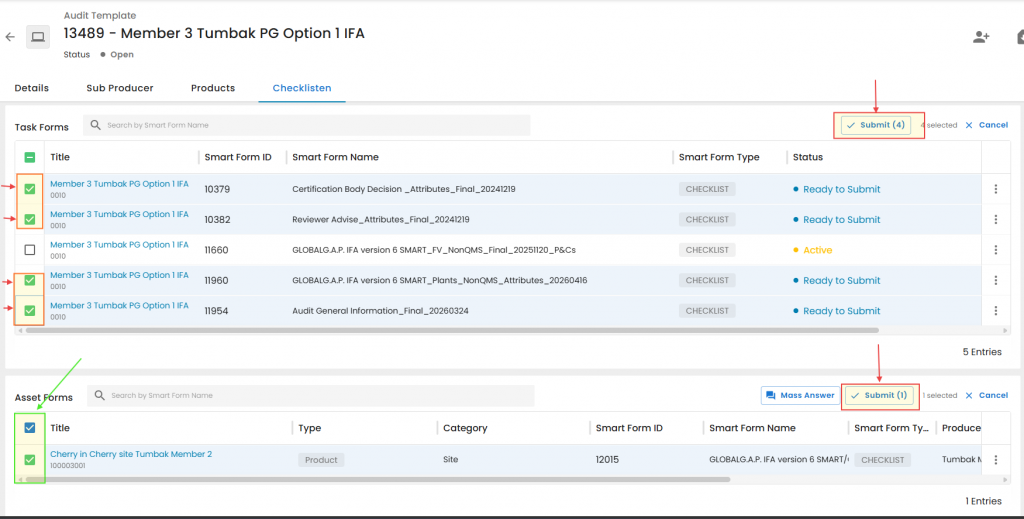
To use this feature, select the Smartforms to be submitted, either individually or by using the “All” checkbox. Once the selection is complete, click “Submit”.
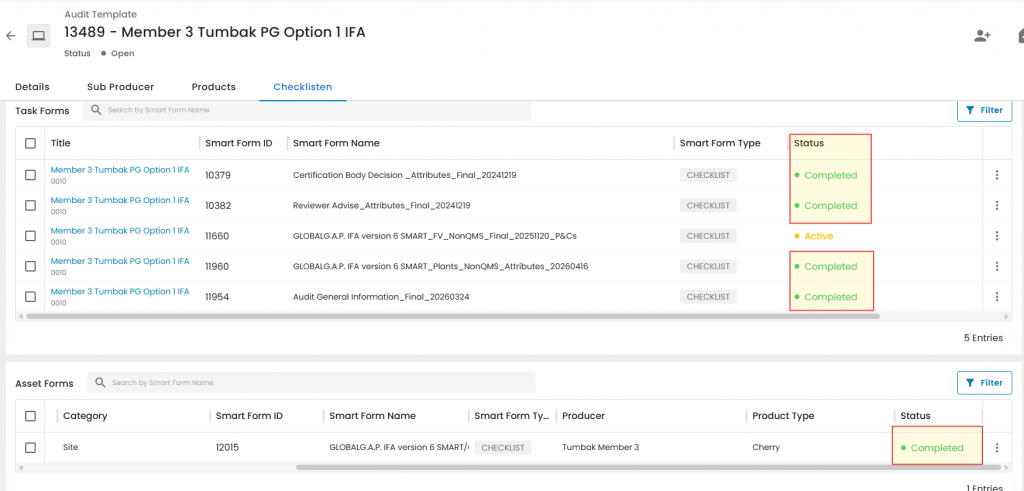
Note: As with individual “Save and Submit”, this action closes the selected Smartforms and prevents further editing.
The example below includes an Active P&C Smartform that has not been completed due to time limitations. This is expected behaviour and does not indicate a system issue.
Important: Smartforms should only be submitted in bulk (or individually using “Save and Submit”) after the audit review process has been completed. During audit management and data entry, use the “Save” button available on each Smartform page to preserve progress and keep the forms editable for any necessary corrections.
Submitted Smartforms can only be “unlocked” via the Certificate Modification process!!!